
CRM Migration to HubSpot

Switch CRMs without losing your data or your team's momentum

We hold HubSpot's CRM Implementation Accreditation, their highest credential for complex CRM builds, data migration, custom objects, and multi team rollouts. Every migration is architectured before we touch a record, so your team goes live on a CRM they can trust.

300+ HubSpot implementations across North America
CRM Implementation Accredited | Zero data loss guarantee
crm-migration-services
Why migrations fail

The risk isn't switching CRMs. It's how you switch.


Teams that migrate without a proper data architecture end up with a new CRM and the same problems. Duplicate contacts, broken relationships between records, missing deal history, and a sales team that stops using the tool within 90 days.

Every migration we run starts with a data audit, not an import. We map your fields, document what migrates and what doesn't, run a test migration on a subset of your data, and validate before we touch production. Your old CRM stays live until your team signs off.
Data audit before any migration work
Every field, custom object, and relationship documented before a single record moves.


Field-by-field mapping and validation
Custom fields mapped to HubSpot properties. No data left orphaned in transit.


Test migration before production
A representative data subset migrated and validated. Problems caught before they scale.


Parallel systems until sign off
Your old CRM stays live. No team goes without a working system at any point during the migration.


RevOps architecture built in, not bolted on
We don't just move data, we build the HubSpot architecture your revenue process needs from day one.

Migration process

Five stages. No surprises.

Every migration follows the same structured process, regardless of your source CRM or data volume.

01

Week 1: Data Audit & Scoping

Full inventory of your current CRM: object types, field counts, custom configurations, activity history, and integrations. We document exactly what migrates, what doesn't, and why, before any work begins.

Field inventory • Custom object audit • Integration mapping • Migration scope doc

02

Week 1–2: HubSpot architecture design

We design your HubSpot data model, custom properties, pipeline stages, lifecycle stages, and any custom objects, before a single record moves. This is where your revenue process gets built into the CRM, not retrofitted later.

Property mapping • Pipeline design Lifecycle stages Custom objects

03

Week 2-3: Test migration

A representative subset of your data migrates to a sandbox HubSpot portal. Every field, relationship, and activity log validated against the source. Issues resolved before production migration.

Sandbox migration •  Field validation  •  Relationship checks  Your team review

04

Week 3-5: Production Migration

Full data migration with parallel systems running. Your old CRM remains active throughout. We migrate in batches, validate each batch, and run a final integrity check before the cutover date your team has approved.

Batched migration •  Parallel CRM operation  •  Integrity validation  Cutover planning

05

Week 4-6: Training and go live

Role-based team training before go live. Sales, marketing, and ops trained on their specific HubSpot workflows. Full documentation delivered. Post-launch support window included to catch any adoption issues.

Role-based training  •  Admin documentation •   Post-launch support

Architect pricing

Custom scoped. No generic price ranges.

CRM migration complexity varies too much for a published price list. Every engagement is scoped after a discovery call, and we'll never quote a number until we understand your data.

Book a Scoping Call
Why use a migration partner

The import tool moves records. A partner builds the system they land in.

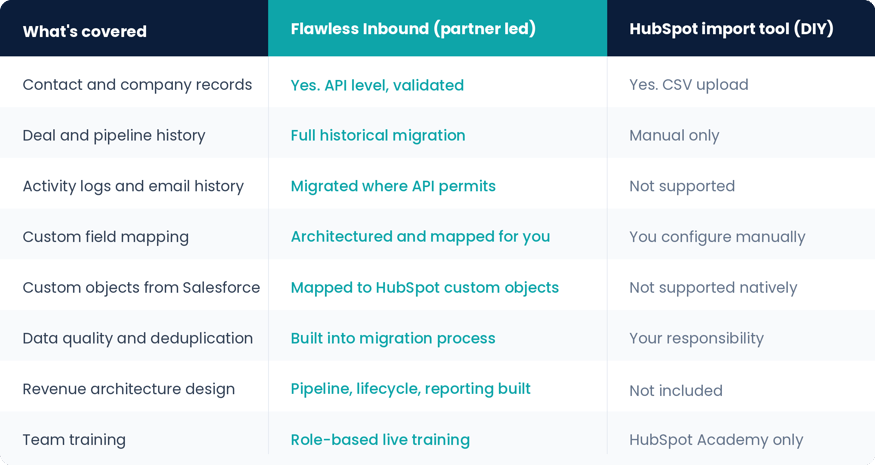
HubSpot's CSV importer handles contacts and companies. Everything else, deal history, activity logs, custom objects, field mapping, data deduplication, and the revenue architecture your team needs on day one, requires a partner who has done this before.

migration_comparison_table
Who we work with

Teams that can't afford to lose their data or their momentum

CRM migration projects fail when teams underestimate what a clean, well-architected switch actually requires. We work with B2B companies globally that have real data, complex processes, and a sales team that needs to be productive on day one. 

SaaS Professional Services Manufacturing Distribution High-Tech B2B

Outgrowing Salesforce costs

Salesforce licensing costs have scaled past what your team can justify. HubSpot Pro or Enterprise covers what you actually use at a fraction of the price, but only if the migration is done right. 

Switching from a CRM your team stopped using

Zoho, Dynamics, or an older platform that was never set up properly. You're migrating the data AND building a revenue process for the first time. 

Post-acquisition CRM consolidation

Two businesses, two CRMs, two data models. A migration that needs to bring them together without losing either team's history. 

Migrating to align sales and marketing

Marketing is already in HubSpot. Sales is in Salesforce. The disconnect is costing you pipeline visibility and attribution accuracy. 

Frequently asked questions

Most CRM migrations take 4–10 weeks depending on data volume, field complexity, and the number of systems involved. Salesforce to HubSpot migrations with extensive custom fields and historical activity data take longer than Zoho or Pipedrive migrations. Every engagement starts with a scoping call to give you an accurate timeline before work begins.
Yes. Salesforce to HubSpot is one of the most common migrations we handle. We map custom Salesforce objects to HubSpot's data model, migrate historical activity, preserve deal and contact relationships, and set up HubSpot's revenue reporting to replace the Salesforce dashboards your team relied on.
No. We run parallel systems during migration, validate data integrity at every stage, and do not retire your old CRM until sign off is complete. Our process includes a full data audit before migration, field by field mapping, a test migration on a data subset, and a final validation pass before go live.

Yes, wherever the source system supports it. We migrate contact records, company associations, deal history, activity logs, email threads, notes, and attachments. What can be migrated depends on the API capabilities of your current CRM, we document what's in scope before work begins so there are no surprises.

HubSpot requires an onboarding fee for new Professional and Enterprise portals. When you work with a certified partner like Flawless Inbound, that mandatory spend goes directly toward your migration and implementation, you get a properly built CRM instead of just access to HubSpot's standard onboarding materials

Your next CRM should be the last migration you ever need to do.

Tell us where you're migrating from. We'll scope the project and give you a clear plan on the first call.